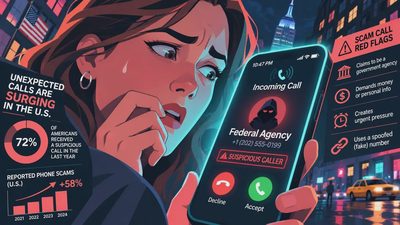
If you are asking, "how do i unhack my phone?" start with one reassuring fact: strange behavior does not automatically mean someone has taken over your device. A stuck app, a failing battery, a deceptive pop-up, or an account password reused elsewhere can look frightening. Take the next safe step instead of deleting everything in a panic.
The safest first move is to stop using the phone for banking, shopping, password changes, and private conversations until you understand what happened. If the phone is displaying a message that claims you must call a number or pay immediately, do not call the number. Use another trusted device to contact the company through its official website or printed statement.
Stabilize the phone in the first five minutes
Disconnect the phone from cellular data and Wi-Fi if you believe someone is actively controlling it. On an iPhone, open Control Center and turn off Wi-Fi and cellular data where appropriate. On Android, use Quick Settings. Do not rely on Airplane Mode if you need to preserve the phone for later review, because settings and evidence can change as you interact with the device. Simply stop opening sensitive apps and place the phone somewhere safe.
If the screen is frozen, a normal restart is reasonable. Do not install a random “cleaner,” remote-support app, or security tool recommended by a pop-up. Scammers often use urgent warnings to persuade people to grant remote access or reveal a one-time verification code. A legitimate bank, Apple representative, Google representative, or mobile carrier will not ask you to read a login code aloud so they can “secure” your account.
Ask a trusted person to photograph suspicious messages, unfamiliar apps, changed settings, and unusual charges. Capture the date and time if possible. Screenshots are useful, but keep the original text messages and emails too. If money, identity documents, or threats are involved, preserving evidence is more useful than trying to prove the cause immediately.
Preserve evidence before you reset anything
Many people searching how do i unhack my phone? want to erase the device immediately. A factory reset can remove unwanted software, but it can also erase information that a carrier, bank, platform, or investigator needs. Before resetting, write down the phone model, operating-system version, phone number, email accounts connected to the device, and the exact behavior you noticed.
Look for concrete signs rather than a general feeling that something is wrong. Examples include a password-reset email you did not request, a new device listed in an account, calls or texts you did not make, an application you do not recognize, or a carrier notice about a SIM change. A warm phone or short battery life alone is not proof of hacking; video streaming, poor reception, aging batteries, and background updates can cause those symptoms.
Save evidence to a separate trusted account or write it on paper if you suspect your primary email is compromised. Do not send sensitive screenshots to an unknown “support” address. The goal is to create a simple incident record: what happened, when it happened, what accounts were affected, and which organizations you contacted.
Secure accounts from a different device
Use a computer or another phone you trust. Start with the email account that controls password resets, because access to email can unlock banking, shopping, social media, and healthcare accounts. Change its password to a long, unique password that has not been used anywhere else. Then review active sessions, recovery email addresses, recovery phone numbers, forwarding rules, and unfamiliar authentication devices.
Turn on multifactor authentication using an authenticator app or security key when available. Text-message codes are still better than no second factor, but a criminal who transfers your number could receive those messages. Never approve a sign-in prompt you did not initiate. If your password manager is on the affected phone, access it from a trusted device and change the password-manager master password if there is any reason to suspect exposure.
Next, secure financial and high-impact accounts. Contact your bank through the number on the back of a debit card or an official statement, not a number in a suspicious message. Ask whether recent transfers, payees, card changes, or contact details look unusual. The same approach applies to payment apps, credit-card accounts, medical portals, and your mobile-carrier account.
If you are still wondering how do i unhack my phone?, remember that account recovery often matters more than the handset itself. A clean phone connected to a stolen email account can be compromised again within minutes.

Check the phone without making the problem worse
After important accounts are protected, review the phone carefully. Remove applications you do not recognize, especially those installed shortly before the problem began. On Android, review app permissions, accessibility access, device administrator apps, and the list of installed applications. On an iPhone, review installed profiles under VPN and device management, as well as app permissions, unknown configuration profiles, and Apple Account devices.
Update the operating system and applications through the phone’s normal settings or the official App Store or Google Play Store. Updates close known security weaknesses and often fix crashes that look like an intrusion. Change the phone unlock code, use Face ID, Touch ID, or a fingerprint feature where appropriate, and disable lock-screen previews for financial or authentication messages.
If unfamiliar management software, persistent pop-ups, unauthorized calls, or repeated account takeovers continue, contact the manufacturer or a reputable local repair professional. Tell them exactly what you observed. Avoid anyone who promises secret “hacking removal,” demands cryptocurrency, or wants unrestricted remote access before explaining the work and price.
Call the carrier and protect the household
A stolen phone number can be used to receive password-reset codes, so contact your mobile carrier if service suddenly stopped, a SIM-change notice appeared, or calls and texts behave strangely. Ask whether a recent SIM replacement or number transfer occurred. Add or confirm an account PIN and ask about number-transfer protections. If the phone was lost or stolen, the carrier can suspend service while you secure accounts.
Tell family members what happened without blame. A useful script is: “I am handling a phone security issue. Please do not click messages claiming to be from me, send money, or share a verification code until I confirm by calling you.” This matters because an attacker may impersonate the affected person through text, email, or social media.
If financial information was exposed, monitor statements and consider placing a fraud alert or credit freeze through the major credit bureaus. Report scams to the Federal Trade Commission at ReportFraud.ftc.gov. For stolen identity documents or threats, keep records and contact the appropriate agency rather than negotiating with the person making demands.
Finish with a repeatable safety routine
Once the phone is stable, make a short household incident card. Record the carrier, bank contact method, primary email, recovery options, device model, and the person who should be called first. Keep it offline and do not write full passwords on it. This is especially helpful when helping a parent who is stressed or when several family accounts are connected.
Review account sessions once a month, install updates promptly, and remove apps no one uses. Use a different password for every important account, back up photos and documents, and teach children and older relatives that urgency is a warning sign, not an instruction. A family rule such as “we verify money requests by voice” prevents many secondary scams.
When someone asks how do i unhack my phone?, the answer is not one magic app or dramatic reset. Stabilize first, preserve evidence, secure the email and financial accounts from a trusted device, check the phone, and involve the carrier when the number may be affected. Take the next safe step, then the next one.