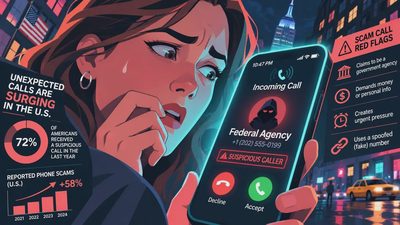

If you are asking, “phishing is what type of attack,” start with the safest answer: it is a social engineering attack that tricks a person into revealing information, opening a harmful link, sending money, or giving an attacker access. The message might arrive by email, text, phone call, social media, or a fake login page. You do not need to panic, and you do not need to blame the person who clicked. Take the next safe step.
Phishing in plain English
Phishing works by impersonating someone you already trust. A message may appear to come from your bank, a delivery company, your employer, a school, a healthcare portal, or a relative. The attacker creates urgency: “Your payment failed,” “Your account will close today,” or “I need a gift card right now.” The goal is to move you from careful thinking to quick reaction.
Technically, phishing is a form of social engineering because the attacker manipulates human judgment rather than relying only on a software vulnerability. It can also be part of a credential theft attack, malware campaign, identity theft scheme, or business email compromise. That is why one suspicious message can have several consequences, from an exposed password to an unauthorized bank transfer.
A useful household explanation is this: phishing is a fake conversation designed to make you hand over a key. The key might be a password, one-time verification code, Social Security number, credit card number, or remote-access permission.
Common forms of phishing
Email phishing is the familiar version, but the same method appears in several channels. Smishing uses text messages, often pretending to be a package carrier, toll agency, bank, or employer. Vishing uses voice calls, including automated messages that direct you to “press one” or provide a verification code. Social media phishing can arrive as a direct message from a compromised friend’s account.
Spear phishing targets a specific person with details that make the message seem believable. A parent might receive a note using a grandchild’s name. A small-business employee might get a request that appears to come from a manager. Whaling focuses on executives or people who can approve payments. Clone phishing copies a legitimate message and changes the link or attachment.
When someone asks phishing is what type of attack, the best short response is that it is usually a deceptive, human-focused attack delivered through electronic communication. The label describes the method, not just the channel.

How to inspect a suspicious message
Do not click first and investigate later. Read the message for pressure, unusual wording, unexpected attachments, and requests for secrets. Hover over a link on a computer without selecting it, or press and hold carefully on a phone if your device shows the destination. A strange domain, extra hyphen, misspelling, or unrelated website is a warning sign. However, polished grammar does not prove a message is safe, and poor grammar does not prove it is fraudulent.
Verify through a separate route. If a text claims to be from your bank, open the bank’s known app or type its website address yourself. Do not use the phone number, link, or reply option in the suspicious message. If a family member supposedly needs emergency money, call the person using a number already saved in your contacts. Ask a simple question that an impersonator is unlikely to answer correctly.
A message can be malicious even when it contains accurate details. Attackers may use information from public profiles, previous breaches, receipts, or social media posts. Treat unexpected urgency as a reason to slow down, not a reason to respond faster.
What to do if you clicked
First, stop interacting with the message. Do not enter additional information, download another file, or call a number displayed on the page. If you entered a password, go directly to the real service and change it immediately. Change that password anywhere else it was reused. Use a unique password and turn on multifactor authentication, preferably with an authenticator app or security key when available.
If you entered bank or payment information, contact the bank using the number on your debit card, credit card, statement, or official app. Explain what happened and ask what account monitoring, card replacement, transfer review, or fraud steps are appropriate. Speed matters most when money or a one-time code was involved.
If a work account was affected, tell the organization’s IT or security contact promptly. If malware may have been installed, disconnect the device from the internet while leaving it powered on if a professional needs to preserve evidence. For a personal device, use the operating system’s security tools and get qualified help before deleting everything in frustration.
Preserve evidence without shame
Take screenshots showing the sender, phone number, email address, message, link, and any transaction details. Save the original email when possible instead of forwarding it, because technical headers can help an organization investigate. Write down the approximate time, what was clicked, what information was entered, and what happened afterward.
This record is useful when speaking with a bank, employer, email provider, platform, or law enforcement agency. It also prevents the family story from changing under stress. Do not keep clicking the message to collect more evidence, and do not reply to insult or threaten the sender.
A calm script for a parent or spouse is: “You are not in trouble. These messages are designed to look real. Let’s stop here, save what we can, and contact the real organization together.” That response protects trust and makes future reporting more likely.
What phishing does not mean
Knowing phishing is what type of attack does not mean every suspicious message proves an account was hacked. Opening a message is generally less serious than entering credentials, approving a login, installing software, or sending money. Risk depends on what happened after the message arrived.
Likewise, seeing a familiar logo does not authenticate a message. Logos, sender names, caller ID, and copied signatures are easy to imitate. A real company may contact you, but a genuine-looking message still deserves independent verification when it requests payment, passwords, identity documents, or security codes.
Do not purchase a security product simply because a pop-up claims your computer is infected. Close the page, use trusted support channels, and avoid remote-access tools offered by an unsolicited caller. Security software can help, but it cannot decide whether a family member should trust a request for money.
Build a simple household response plan
Keep a paper incident card with official bank numbers, your mobile carrier’s support number, email recovery instructions, and the names of trusted helpers. Store it somewhere private, not beside a computer where visitors can photograph it. Make sure each important account has a unique password, current recovery information, and multifactor authentication.
Agree on a family rule: no one sends money, shares a verification code, or changes a password because of an unexpected message without a second conversation. This rule should apply even when the request appears to come from a spouse, child, boss, or bank. A family group chat can provide that second check, but confirm that the chat itself is genuine.
Review connected accounts every few months. Remove old apps, unused email forwarding rules, unfamiliar login sessions, and saved payment methods that no longer serve a purpose. Update phones, browsers, and computers because security updates reduce separate technical risks, even though they cannot replace careful verification.
The next safe step
If you are still wondering phishing is what type of attack, remember the practical answer: it is deception used to persuade a person to surrender information, access, money, or control. The right response is not embarrassment. Stop, verify independently, preserve evidence, secure affected accounts, and notify the organization that can help.
Start with the message in front of you. Do not click the link. Open the official app or call a trusted number, then ask for help if the situation involves money, identity documents, a work account, or a child’s device. A calm household process is more valuable than a perfect reaction. Take the next safe step.