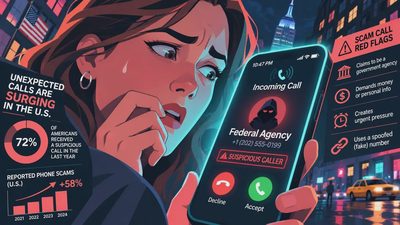

Security of cyberspace can sound like a government or corporate concern, but it starts at the kitchen table. Your family uses email for bank alerts, phones for two-factor codes, healthcare portals for appointments, and shared accounts for shopping and school. A problem in one place can quickly affect another. The goal is not to become a professional analyst or buy every security product on the market. It is to make the next safe step obvious when something feels wrong.
I use a simple household approach: stabilize the situation, preserve useful evidence, recover the account or device, notify the right organization, and prevent the same chain reaction next time. This works whether a parent receives a suspicious bank call, a child loses access to a gaming account, or a spouse clicks a link that now looks questionable.
What security of cyberspace means at home
In plain English, security of cyberspace means protecting the digital places your household depends on. That includes accounts, devices, connections, personal information, and the people who use them. It is not only about stopping a dramatic hack. It also covers avoiding account takeovers, spotting impersonation scams, installing updates, limiting unnecessary access, and having a recovery plan.
Think of your digital life like a home with several doors. A password is one lock, a phone number is sometimes a key for recovery, and an authenticator app can be a second lock. If the same password opens email, banking, shopping, and cloud storage, one stolen key can open several rooms. That does not mean disaster is certain. It means the household has a useful improvement available: give the most important accounts their own strong credentials.
Start with email because it often controls password resets elsewhere. Then review financial accounts, your mobile carrier account, cloud storage, healthcare portals, and any account that stores payment information. You do not need to map every website in one evening. Ten focused minutes on the most important accounts is a better start than an ambitious plan nobody finishes.

The first five minutes after something suspicious
When a message, call, or device behavior feels wrong, pause before clicking, replying, deleting, or transferring money. If a caller says they are from a bank, hang up and use the number on the back of the card or the institution's official website. Do not use a number supplied in the unexpected message.
Next, ask what actually happened. Did someone disclose a password? Was money sent? Was a link opened? Is the device showing a warning, or is someone simply making an urgent claim? Separating observed facts from guesses reduces panic and helps support staff respond faster.
Save evidence before cleaning up. Keep screenshots of messages, caller numbers, email addresses, transaction records, website addresses, and the time of the event. Forward suspicious email as an attachment when a bank or platform requests it, but do not keep interacting with the sender. If money moved, contact the bank or payment service immediately and ask about stopping, recalling, or disputing the transaction.
A useful family script is: “You are not in trouble. We are going to pause, save what happened, and contact the real organization through a trusted channel.” That sentence helps a parent or child tell you the truth instead of trying to hide an embarrassing mistake.
Build a household account map
Security of cyberspace becomes easier when the family knows which accounts matter most. Create a paper or offline list with the service name, account owner, recovery email, recovery phone, and the location of backup codes. Do not write full passwords on a sheet that sits beside the computer. A reputable password manager can store those credentials, while the household keeps a carefully protected emergency access plan.
Mark accounts by impact. Primary email, mobile carrier, banking, credit cards, tax services, healthcare portals, and cloud photo storage deserve attention before restaurant memberships or old shopping accounts. Check whether each important account has a unique password and multifactor authentication. An authenticator app or security key is generally stronger than a text message, though text-based codes are still better than having no second step.
Review recovery details twice a year. An old phone number, former work email, or shared family address can create confusion during an urgent recovery. Remove unused devices and active sessions when the service offers that option. For a family member who needs help, explain that you are organizing a map, not demanding access to every private conversation.
Protect devices without creating fear
Updates are one of the most practical parts of security of cyberspace. Turn on automatic updates for phones, computers, browsers, and home routers when that setting is available. Use a screen lock, enable device-finding features, and install applications through official app stores. A modern iPhone, Android phone, Windows PC, or Mac is not automatically unsafe because it shows an odd pop-up. Close the page, restart if needed, and investigate before assuming the device is infected.
Home Wi-Fi also deserves a short review. Change the router's default administrator password, use WPA2 or WPA3 encryption when supported, and update the router's firmware. A guest network can keep visitors' devices separate from family computers, printers, and smart-home equipment. You do not need to inspect every technical setting. Focus on the controls that reduce access and make recovery possible.
Paid antivirus, identity monitoring, and password managers can be useful, but none is a universal answer. A subscription cannot compensate for reusing a banking password or approving an unexpected login prompt. Choose tools that the household will actually use and understand how cancellation, alerts, and support work before paying for a long plan.

Across generations: help without taking over
Security of cyberspace is often a family communication problem as much as a technical one. An older parent may fear losing independence, while a teenager may fear losing privacy or a gaming account. Start with the specific risk rather than a lecture. Say, “Let us make your bank alerts easier to verify,” instead of, “You need better security.”
Agree on a repeatable rule: no one in the family sends money, shares a one-time code, installs remote-control software, or changes a password during an unexpected urgent call. Real organizations may verify identity, but a surprise caller should not pressure someone into secrecy. Create a family callback phrase for unusual requests, especially when scammers imitate a relative's voice or number.
For children, separate safety education from punishment. Review privacy settings, recovery email ownership, app permissions, and what to do when a stranger messages them. For parents, write the bank's official phone number on the incident card in the kitchen drawer. The goal is a small system that works when somebody is tired, rushed, or embarrassed.
A ten-minute security check
Use the next ten minutes to take one concrete action. First, update the phone or computer that handles your most important accounts. Second, open your primary email settings and review recent sign-ins, recovery information, and multifactor authentication. Third, change any reused password connected to email, banking, or your mobile carrier. Fourth, confirm that bank and card alerts go to a current phone number or email address.
Then tell one household member the plan for suspicious contact: stop, do not reply, save evidence, and call the organization independently. Write those four words on paper where everyone can find them. If an incident is already underway, contact the bank, carrier, platform, or relevant government reporting service directly rather than relying on a search ad or message link.
This is the practical heart of security of cyberspace: fewer shared secrets, better recovery options, and calmer decisions. You do not need perfect protection to make a meaningful improvement. You need a household that knows what to pause, what to save, and who to call.
When to get additional help
Security of cyberspace sometimes requires outside support. Contact a financial institution immediately for unauthorized transactions or exposed payment details. Contact your mobile carrier if a phone suddenly loses service, a SIM change is reported, or account access stops working. Use the official support channel for a compromised email, social media, or gaming account. If identity information was misused, consider IdentityTheft.gov and the appropriate credit reporting resources.
A local computer professional can help with a device you cannot safely assess, but avoid anyone who demands gift cards, cryptocurrency, remote access, or secrecy as a condition of help. A legitimate helper should explain what they plan to do and let you make the decision. Record case numbers, dates, names, and promised follow-up steps in your incident card.
No family can eliminate every online risk. A calmer response, a current account map, and a few strong habits can limit the damage and shorten recovery. Take the next safe step, then help the next person do the same.