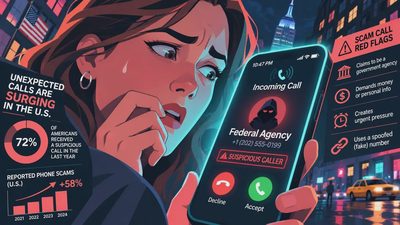
If you searched for you've been hacked email, you probably saw a strange sent message, a password-reset notice, or a login alert you do not recognize. Start with one calm decision: do not click links in the alert or reply to the person who sent it. Open your email provider's official app or type its address yourself. You are not required to solve the entire incident in one sitting. Take the next safe step.
First five minutes after an email account compromise
Use a trusted device if possible, such as your personal laptop or phone, rather than a public computer. Sign in directly through Gmail, Outlook, Yahoo Mail, iCloud Mail, or your provider's known app. If you can still enter the account, change the password immediately. Create a new password that is long and unique; do not recycle the password used for banking, shopping, your work account, or social media.
Next, review active sessions and signed-in devices. Remove anything unfamiliar, including an old phone, browser, or location you cannot explain. Look at the account's recovery phone number and backup email. Attackers sometimes replace these details so they can regain access after you change the password. Turn on multifactor authentication, preferably with an authenticator app or security key. Text-message codes are better than no second factor, but they are not the strongest option when an account contains financial or medical information.
If you cannot sign in, use the provider's official account-recovery page. Do not pay a stranger who promises instant recovery. Real support will not ask for your password, one-time code, or full payment-card number through an unsolicited message.
Check what the intruder changed
Once access is stable, inspect the account instead of assuming the password change solved everything. Search Sent, Deleted, Archive, and Drafts for messages you did not create. Review forwarding settings, filters, automatic replies, delegated access, connected apps, and email signatures. A hidden forwarding rule can copy future messages to an outside address even after you regain control.
Look for password-reset emails from other services. Your inbox may contain links for online stores, utilities, school portals, health systems, or financial accounts. Change passwords on any account that reused the compromised password, starting with your primary email and money-related services. Do this by visiting each service directly, not by clicking a reset link in an old email.
You may notice a message that says you've been hacked email, or a contact may ask whether you sent it. That does not prove every account on your phone is compromised. It does mean you should check the account's activity and warn contacts not to open unexpected links. A simple message works: My email account had suspicious activity. Please ignore recent links or money requests from me and contact me another way.
Protect money and identity without panic
Email is often the reset key for other accounts, so treat a compromise as an account-chain problem. Review bank, credit-card, payment-app, tax, payroll, and investment accounts for password changes, new payees, transfers, shipping addresses, or contact updates. Call the number printed on the back of your card or shown inside the official banking app. Do not use a number from a suspicious email.
Ask the bank to review recent activity and add an account note if unauthorized transactions occurred. If money moved, report it promptly and follow the bank's instructions. You can also report suspected identity theft through IdentityTheft.gov, a federal resource that provides recovery guidance. Save confirmation numbers and the names or departments of people you contact.
If sensitive records were in the inbox, consider a fraud alert or credit freeze through the major credit bureaus. A freeze is free and restricts access to your credit file until you lift it; it does not replace changing passwords or reviewing transactions. The goal is proportionate protection, not an expensive product purchased under pressure.

Preserve evidence before deleting everything
Screenshots and original details can help a provider, bank, employer, or law-enforcement agency understand what happened. Save unusual login alerts, suspicious messages, sender addresses, timestamps, forwarding rules, changed recovery information, and unauthorized transactions. Keep the original email when practical because its headers can contain useful routing information. Do not forward malicious messages to family members as a warning; send a plain-text explanation instead.
Create a short incident note with the date, account, device used, actions taken, and support case numbers. If a family member asks, you've been hacked email is not a complete diagnosis. It is a signal to separate confirmed facts from guesses. For example, confirmed facts might be a sent message and a new login from an unfamiliar device. A guess might be that the attacker read every message or installed malware. That distinction keeps everyone focused.
When the email account may not be the whole problem
A compromised password does not automatically mean someone controls your phone or laptop. Still, investigate if the device shows new applications, browser extensions, unexpected antivirus warnings, disabled security tools, repeated pop-ups, or unusual battery and network activity. Update the operating system, browser, and security software. Remove extensions you do not recognize.
If the device is managed by an employer or school, contact that organization before wiping it. If the account holds medical, payroll, or client information, notify the responsible privacy or security contact. A professional can help preserve evidence and check for malware when the facts justify it. Avoid random remote-support ads and unsolicited callers who claim they detected the breach.
Make the next incident easier on your household
After recovery, use a password manager to create unique passwords and store them safely. Add multifactor authentication to email first, then banking, shopping, social, and healthcare accounts. Keep recovery codes in a secure location separate from the phone. Review account activity monthly and remove old apps, devices, and family-sharing permissions.
Families benefit from a simple rule: no one sends money, passwords, gift-card codes, or verification codes because of an email alone. A parent, spouse, or teenager can pause and call through a known number. You can say, If this is real, we can verify it from the official app. That script works better than blame.
If you have been hacked email confusion today, begin with the account you can verify, the device you trust, and the evidence you can save. Change the password, remove unknown access, secure connected accounts, and notify the right organization. You do not need perfect technical knowledge to make progress. Take the next safe step.