When families search for password manage advice, they usually have a practical problem: too many accounts, repeated passwords, or a parent who cannot find the login for a medical portal. The safest response is not to panic or attempt a complete digital overhaul in one evening. Start with the account that matters most, secure it, and build a repeatable household system from there.
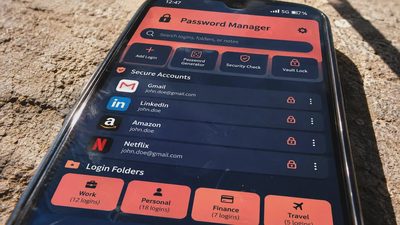
A password manager can store unique passwords, create stronger replacements, and keep family members from writing sensitive information on loose paper. It is not magic, and it does not remove every risk. It does give your household one organized place to manage credentials, recovery details, and emergency access. Take the next safe step by choosing one important account and mapping what protects it today.
What password manage means in real life
The phrase password manage often describes several related tasks rather than one button. You might be creating a new password, saving it securely, finding a forgotten login, changing reused credentials, or helping another person recover access. Separating those tasks makes the work less overwhelming.
Begin with an account map. Write down the email address used for banking, healthcare, shopping, school, utilities, and your mobile carrier. Do not write the passwords in the same unprotected document. Record the account name, recovery email, phone number, and whether multifactor authentication is enabled. This map helps you see which accounts could unlock others.
Your primary email deserves early attention because it often receives password-reset links. So does your phone carrier account, since control of a phone number can affect text-message verification. Financial accounts, tax services, health portals, and cloud storage follow close behind. A gaming account matters too if it stores payment information or connects to a child’s email.
Next safe step: open your primary email security settings and confirm that the recovery phone and backup email still belong to you. Complete that check before changing ten unrelated passwords.
Choose a password manager without chasing perfection
When you password manage across a household, the best tool is one people will actually use. Well-known options include 1Password, Bitwarden, Dashlane, and built-in services such as Apple Passwords or Google Password Manager. Each has different sharing, device, recovery, and pricing features. A paid family plan commonly costs several dollars per month, while some built-in or individual options cost nothing.
Look for end-to-end encryption, support for your phones and computers, secure sharing, emergency or recovery options, and clear export procedures. You should be able to understand what happens if the subscription ends or the account owner loses a phone. Read the provider’s recovery documentation before storing every family credential there.
The master password protects the vault, so it should be long, unique, and memorable. A sentence made from several unrelated words is often easier to remember than a short collection of symbols. Never reuse that master password for email, banking, or shopping. Turn on multifactor authentication for the manager itself, preferably with an authenticator app or security key when practical.
Avoid choosing a product only because an advertisement promises total protection. A manager can protect stored credentials, but it cannot stop a convincing scam call, a malicious browser extension, or someone who approves a fraudulent sign-in request.
Move from repeated passwords to unique ones
Password manage work becomes valuable when each important account receives a different password. If one retailer suffers a data breach, a unique banking password prevents criminals from trying the exposed combination elsewhere. This does not mean every account needs immediate attention tonight.
Start with your email, financial institutions, mobile carrier, tax account, and health portal. Use the manager’s generator to create random passwords, then save them directly in the vault. Sign out and back in once to confirm the new credential works. Keep the old password out of notes, screenshots, text messages, and shared family chats.
For lower-risk accounts, change credentials during normal maintenance. A recipe site does not need to outrank your credit union. However, replace any password that has been reused across several sites, especially if it appears in an old breach notification. If you receive a genuine security alert, visit the company through its known app or typed web address rather than clicking a link in an unexpected message.
Share access without sharing everything
Households often need shared access, but handing over one master password creates confusion and removes useful boundaries. A family manager can create a shared vault for utilities, streaming services, school accounts, pet-care services, or emergency information. Keep private work, financial, and personal credentials in separate vaults.
Before you password manage for a spouse or parent, agree on what help means. A simple script is: “I can help organize the accounts, but I will not need to read your private messages or see every financial detail. Let’s decide together which logins should be shared.” That sentence reduces embarrassment and makes consent clear.
For an older parent, set up the manager while sitting beside them, if possible. Show how to unlock it, search for a login, and approve a sign-in. Do not silently take over the account. If they cannot manage the master password independently, discuss a trusted emergency contact and the provider’s recovery process.

Plan for a lost phone or locked vault
A useful password manage system includes a recovery plan written before a crisis. Keep a paper incident card in a secure home location with the manager’s provider name, emergency contact instructions, phone carrier number, bank fraud number, and the date the information was last reviewed. Do not put the master password on that card unless you have a carefully controlled plan for protecting it.
If a phone disappears, use another trusted device to mark it lost, change the email password if needed, and contact the carrier. Review active sessions for email, banking, and the password manager. If a family member cannot unlock the vault, follow the provider’s documented recovery process rather than searching random support numbers.
Save evidence during an incident. Take screenshots of suspicious alerts, record dates and phone numbers, and keep fraudulent messages. Contact the bank through the number on a statement or official app. Password problems and identity theft often overlap, but a locked account alone does not prove someone has stolen your identity.
A ten-minute monthly household check
Once a month, password manage maintenance can be brief. Ask whether anyone changed a phone number, lost a device, created a new email address, or received an unusual sign-in alert. Review the manager’s security dashboard for reused, weak, or exposed passwords. Prioritize accounts connected to money, identity, or recovery.
Check that multifactor authentication still works and that backup codes are stored safely. Remove former household members from shared vaults and update access after a separation, move, or change in caregiving responsibility. Review children’s accounts as they begin using social platforms, school systems, or online marketplaces.
Do not turn the review into an interrogation. Try saying, “Let’s make sure our emergency plan still works,” rather than, “Why did you use that password again?” People are more likely to ask for help when the conversation is practical instead of shaming.
Take the next safe step today
You do not need a perfect security setup before dinner. To password manage responsibly, secure the primary email, choose a reputable manager, create a strong unique master password, and turn on multifactor authentication. Then replace reused passwords on the accounts that could cause the greatest harm.
After that, build shared access thoughtfully and keep a recovery card where your household can find it. A manager is a tool, not a guarantee, but it can remove the daily friction that causes people to reuse passwords or leave accounts unmanaged. Start with one login, explain the plan to the people who depend on you, and take the next safe step.